How it works
Signals go in, one immutable state comes out. A walk through the watcher, the probe and the quality metrics.
net-watch has one idea: many cheap signals in, one state out. The watcher collects evidence from the browser and from your own requests, decides whether the user is online, measures how good the link is, and publishes the result as a single immutable object. Everything else, the banner, the React hook, the Vue composable, only reads that object.
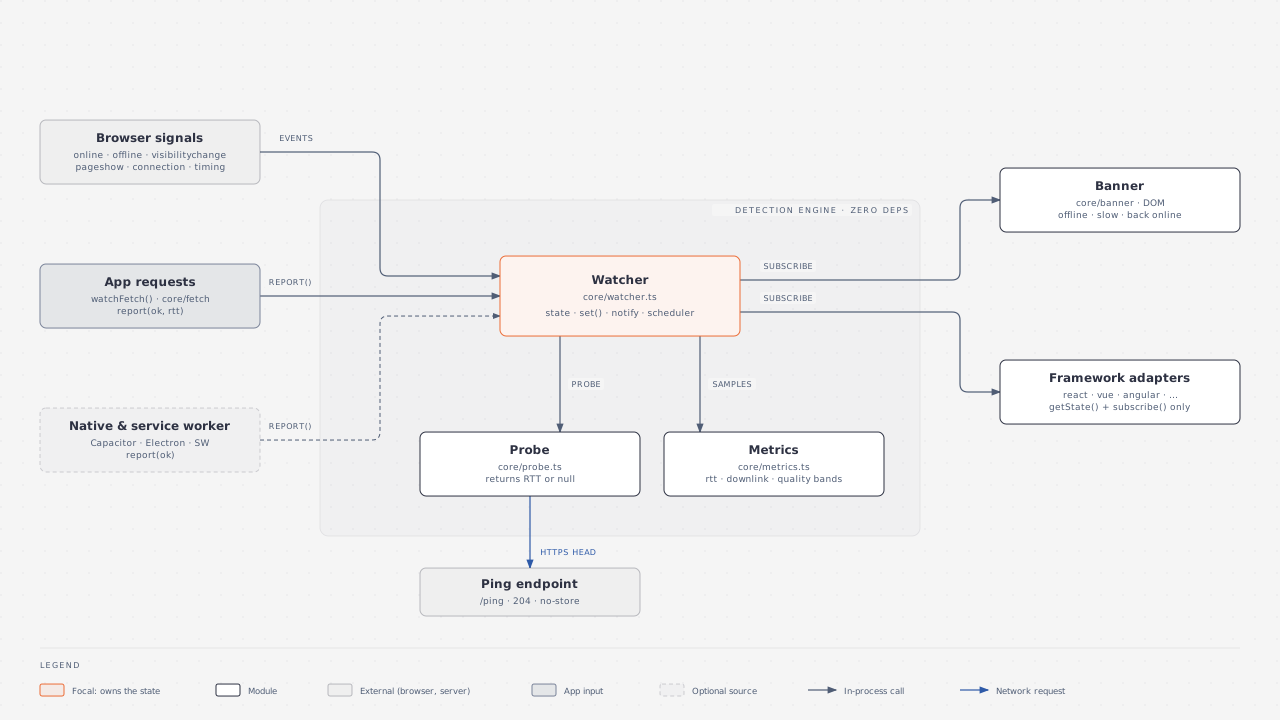
The three signal layers
The watcher asks the cheapest source first and only escalates when it has to.
| Layer | Signal | Cost | How far to trust it |
|---|---|---|---|
| 1 | navigator.onLine and the online / offline events | No requests | false is reliable. true only means a network interface is up |
| 2 | Your own requests, through watchFetch or report() | No extra requests | A success proves you are online, unless layer 1 says false. A network error is only a suspicion |
| 3 | A HEAD request to your pingUrl | One request, only when needed | Confirms or refutes the suspicion |
The Detecting offline page has the exact rules. This page shows how they fit together.
Suspects trigger a probe
Most of the time the watcher does nothing. It sends a probe only when it has a reason to doubt the current answer. These events are suspects:
- startup, when the watcher is created
- the browser's
onlineevent - the tab becoming visible again
- a page restored from the back/forward cache (
pageshow) report(false), which is whatwatchFetchsends after a network error
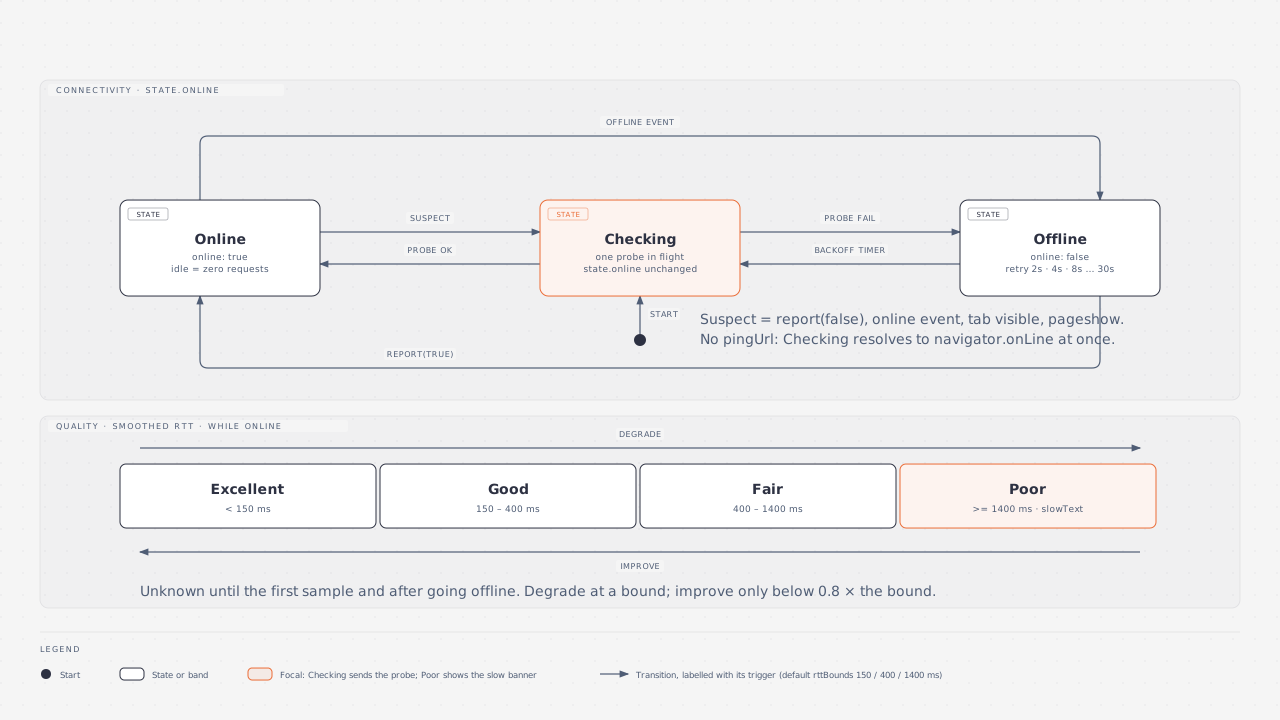
A suspect moves the watcher to a checking step. With a pingUrl it sends one probe. Without one it answers from navigator.onLine at once, and report(false) is ignored because nothing could confirm it.
Single flight. Only one probe is ever in the air. If a second suspect arrives while a probe is running, check() returns the pending promise instead of sending another request.
A story: the train
Say a user opens your app on a train. You created the watcher with a pingUrl, wrapped fetch with watchFetch, and mounted the banner.
- The app loads. Startup counts as a suspect, so the watcher sends one probe. It succeeds in 120 ms, so the state is
online: true, and the first RTT sample seeds the smoothed value. - The user browses. Each API call goes through
watchFetch. Every response is proof of connectivity and a new latency sample. No probes are sent. The app is online and its traffic does the measuring. - The train enters a tunnel. Radio coverage drops. If the OS notices,
navigator.onLineflips tofalseand theofflineevent fires. The watcher goes offline at once, with no probe, and the banner shows "You are offline". If the OS does not notice, the nextfetchfails with aTypeError,watchFetchcallsreport(false), and the watcher sends a probe. The probe fails, so the watcher goes offline. - Still in the tunnel. The watcher retries on a timer: 2 seconds, then 4, 8, 16, and then every 30 seconds at most. Each retry sends a probe, unless
navigator.onLineis stillfalse, in which case the retry just confirms offline and sends nothing. Quality isunknownandrttanddownlinkareundefined, because old numbers from before the tunnel would be misleading. - The train comes out. The
onlineevent fires, or the next retry succeeds. The watcher probes, gets an answer, and flips toonline: true. The retry timer resets, and the banner shows "Back online" for a few seconds. - Quality recovers. The first fresh samples are slow, so quality starts wherever the first sample lands, often
fairorpoor, and improves as the smoothed RTT falls. It moves up a band only after the RTT is clearly below the boundary, so the banner does not flicker.
| Moment | Signal | Requests sent |
|---|---|---|
| App opens | Startup suspect | 1 probe |
| Browsing | watchFetch successes | 0 extra |
| Tunnel | offline event or failed fetch | 0 or 1 probe |
| In the tunnel | Retry timer | 1 probe after 2, 4, 8, 16, 30, 30 s and so on (none while navigator.onLine is false) |
| Out of the tunnel | online event or next retry | 1 probe |
Retry backoff while offline
While the state is offline and a pingUrl exists, the watcher retries with exponential backoff. The first retry waits 2 seconds, each later wait doubles, and the wait is capped at maxRetryDelay (30 seconds by default). Going back online resets the delay to 2 seconds.
Mobile Safari freezes timers in background tabs, so the retry timer cannot be the only way back. The watcher also re-checks when the tab becomes visible or a page is restored from the cache.
The opt-in heartbeat
By default an online, idle app sends zero requests. That means a connection that dies while the user is reading will not be noticed until something else happens: a request fails, the OS flips navigator.onLine, or the user returns to the tab.
If you need to catch that, set heartbeat to an interval in milliseconds. Every interval, the watcher sends a probe if it is online and the tab is visible. It skips hidden tabs, and it skips the offline state because backoff already covers it. The heartbeat also keeps rtt and quality fresh while the user is idle. It needs a pingUrl.
import { createNetworkWatcher } from '@net-watch/core'

const watcher = createNetworkWatcher({
  pingUrl: '/api/ping',
  heartbeat: 60_000, // one probe a minute while online and visible
})
How quality is computed
Every successful probe and every successful watchFetch request is a latency sample. The watcher keeps a smoothed average (an exponentially weighted moving average with weight 0.3 for the newest sample) and classifies it into a band. The state shows the average rounded to the nearest 50 ms.
Download speed comes from a different source: the browser's Resource Timing entries for large files your page has already downloaded. The watcher computes throughput from them and smooths it the same way. No test files are fetched.
On Chromium, navigator.connection adds effectiveType, type and saveData, and its own rtt and downlink estimates are fed in as extra samples. Other browsers leave effectiveType and type undefined, saveData is false, and rtt and downlink come from measurements only.
Network quality covers the bands, hysteresis and rounding in detail.
Why state is immutable
The state is a plain object. When something changes, the watcher builds a new object. When nothing changes, getState() returns the exact same reference.
- It plays well with frameworks. React's
useSyncExternalStore, Vue'sshallowRefand Angular signals all compare by reference. A stable reference means no extra renders and no loops. - Listeners get the previous state too.
subscribecallbacks receive(state, prev), so you can compare without keeping your own copy.
The watcher notifies only on a visible change. After rounding, if every field is equal to what it was, nobody is called. A stream of similar latency samples, with smoothed values of 128 ms, 131 ms and 126 ms, all round to 150 ms, so listeners hear about it once.
When listeners do fire, onOnline or onOffline run first, then each subscriber in the order it subscribed. A callback that throws does not stop the others; the error is rethrown asynchronously so it still reaches your error reporting.
What destroy() does
destroy() stops everything the watcher started:
- removes the
online,offline,pageshow,visibilitychangeandnavigator.connectionlisteners - stops the Resource Timing observer
- clears the heartbeat and the retry timer
- drops every subscriber
A probe that is already in flight finishes, but its result is discarded. Call destroy() when you create a watcher yourself and its owner goes away, for example in a test or a micro-frontend that unmounts. The sharedWatcher() that adapters use lives for the page and does not need it.
Server-side rendering
Without window, creating a watcher is safe and does nothing: the state is online: true, quality: 'unknown', every metric undefined, and no listeners or timers exist. See the SSR guide.
Next
- Detecting offline: the decision rules in order.
- Network quality: bands, hysteresis and metrics.
- API reference: every option and method.